Introduction
mevlog is a simple way to query data from any EVM-compatible chain - locally, on your own machine, without depending on third parties.
It is an open-source (MIT) alternative to commercial blockchain indexers and data APIs. Instead of using a hosted service and querying an external database, mevlog downloads raw chain data straight from an RPC endpoint, stores it in a local SQLite database, and lets you query it with plain SQL. You own the data. No API keys, no rate limits, no vendor lock-in - just a file on your disk that you can query as much as you want, offline.
What you can do with it
- Download blockchain data efficiently - pull any block range from an RPC node into a local per-chain SQLite store.
- Keep data in sync - follow the chain head live and prune old blocks to cap storage.
- Query with SQL - run read-only SQL against indexed
transactions,blocks, andlogstables, with custom SQLite helpers for working with 256-bit integers, token amounts, ETH/gwei/USD formatting, and ENS names. - Define custom tables - decode the logs you care about (swaps, transfers, any event) into typed columns via config.
- Inspect single transactions and blocks - render a tx, its logs, or a whole block, plus deeper EVM analysis (state diffs, call traces, coinbase payments).
- Generate EVM tracing insights - replay any transaction to extract storage state diffs, decoded call traces, and direct coinbase payments. Tracing runs either through a node’s standard
debug_traceTransactionRPC, or fully locally via Revm - no tracing-enabled RPC required. - Talk to the blockchain over MCP - expose mevlog as a Model Context Protocol server so an AI assistant can query chain data on your behalf.
How it works
mevlog follows a three-step model: index → store → query.
- Index - fetch a block range from an RPC endpoint (using cryo under the hood).
- Store - write the transactions, blocks, and logs into a local, per-chain SQLite database under
~/.mevlog/. - Query - run SQL against that local store. Because the data lives on your disk, queries are fast and free.
These docs walk through each step. See Quick Start to get set up and run your first query.
Quick Start
Install
mevlog is published on crates.io. Install it with Cargo:
cargo install mevlog --locked
mevlog fetches block data using cryo, so the cryo binary must be available in your PATH. Install it with Cargo:
cargo install cryo_cli --locked
Run your first command
On the first execution of the mevlog command a signatures DB has to be downloaded and indexed, but it should take max ~1min.
Fetch and display the transactions in the latest Ethereum mainnet block:
mevlog block-txs -b latest --chain-id=1
It should produce a similar JSON output:
  // ...
      "display_gas_price": "0.16 gwei",
      "tx_cost": "3437206778184",
      "display_tx_cost": "0.000003 ETH",
      "display_tx_cost_usd": "$0.01"
    }
  ],
  "result_count": 156,
  "cached_blocks": 0,
  "new_blocks": 1,
  "latest_block": 25314990,
  "duration": "1.49 s",
  "generated_at": "2026-07-11T13:19:35Z",
  "chain": {
    "chain_id": 1,
    "name": "Ethereum Mainnet",
    "currency": "ETH",
    "explorer_url": "https://etherscan.io",
    "native_token_price": 1674.61477
  },
  // ...
What just happened? You queried a Mainnet blockchain with ZERO config. Under the hood mevlog detects the fastest RPC endpoint from ChainList and uses it to download data.
The first execution against a target block might take a few seconds. But later ALL the data is cached in a local SQLite database (located in ~/.mevlog/) so subsequent queries against the same block ranges are almost instant!
You can run any SQL query against the local database using the query command:
# Find the most expensive TX in the given blocks range
mevlog query \
  -b 25314888:25314988 \
  --chain-id=1 \
  --sql "
    SELECT
      tx_hash,
      format_ether(u256_mul(gas_used, effective_gas_price)) AS cost
    FROM transactions
    ORDER BY u256_mul(gas_used, effective_gas_price) DESC
    LIMIT 1
  "
Produces:
"result": [
  {
    "tx_hash": "0x6bd55342c59905fe4c8a25f43737f60c54d43334cc54472d08f4d0069748ce9a",
    "cost": "0.044113 ETH"
  }
],
See SQL demo to see database structure, available SQLite helper methods, and run queries against the last day of Mainnet data.
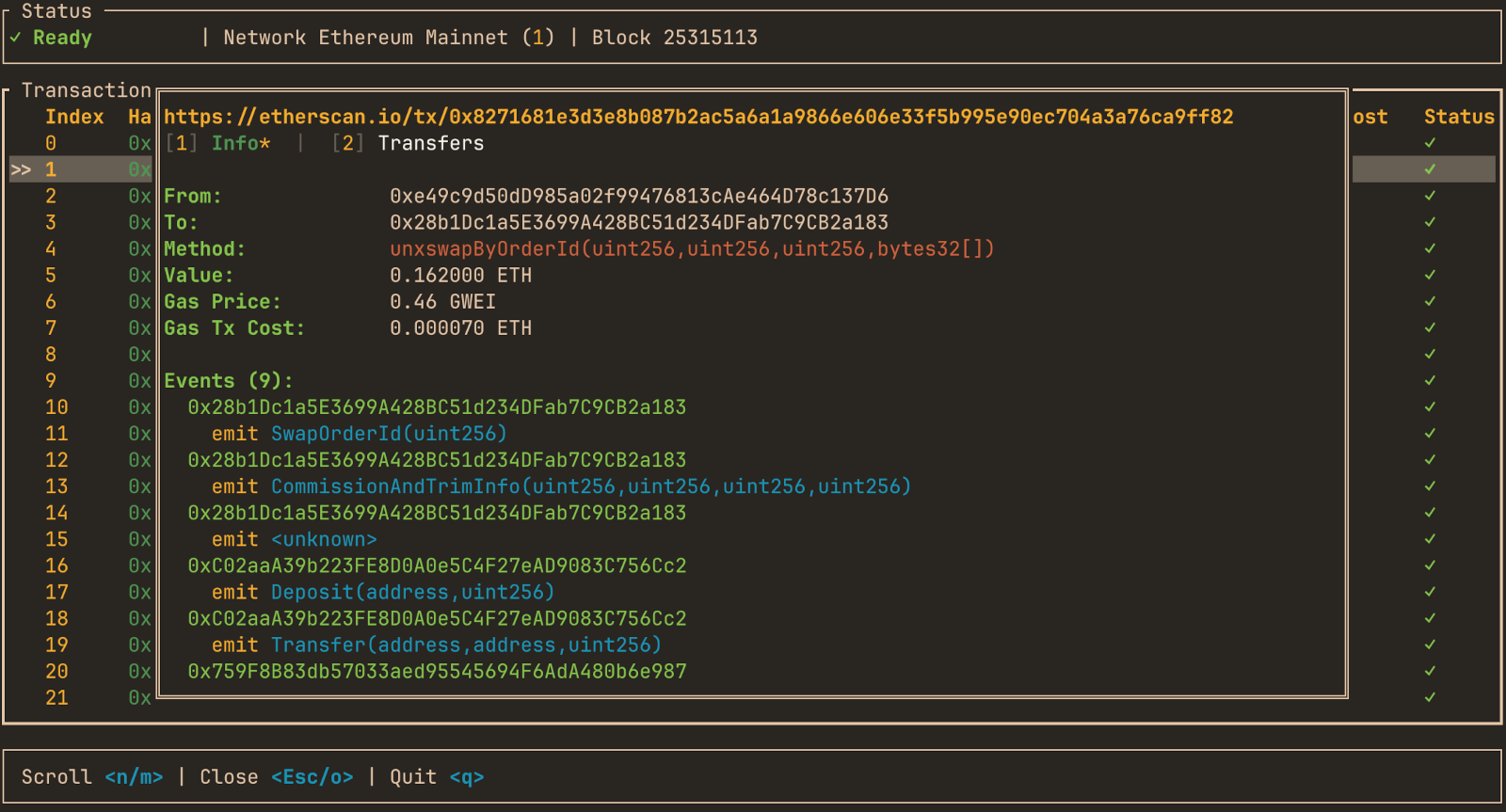
mevlog TUI interface
mevlog comes with a full-blown chains explorer TUI interface. Install it by running:
cargo install mevlog --features=tui --locked
and run:
mevlog tui
It allows exploring over 2k different EVM chains directly from your terminal, using the same SQLite as data storage.
Core Concepts
mevlog works in three steps: index → store → query. Everything the tool does is built on this single pipeline, so it is worth understanding before diving into individual commands.
Index
- mevlog fetches blocks from any EVM-compatible chain over RPC.
- With zero config it auto-selects the fastest RPC endpoint for the target chain from ChainList; you can also pin your own endpoints (see config.toml).
- Indexing pulls transactions, blocks, and logs for a block range. The
indexcommand backfills a range;--livekeeps watching for new blocks. - Every command that needs data first makes sure the relevant block(s) are indexed, so you rarely call
indexdirectly.
Store
- Indexed data lands in a local per-chain SQLite database (
~/.mevlog/mevlog-txs-v1-{chain_id}.db). - The store has three tables:
transactions,blocks, andlogs(see Database Schema). - Once a block is indexed it is cached locally, so repeat queries against the same range are almost instant and hit no RPC.
- A separate signatures database (
mevlog-sqlite-v5.db) holds method/event signatures and chain metadata; it is downloaded prebuilt from a CDN on first run.
Query
- Once data is local, everything else is a read against SQLite.
- The
querycommand runs arbitrary read-only SQL against the store via--sql. - Display commands (
tx,tx-logs,block,block-txs,block-logs) are convenience wrappers: they index the needed block(s), then render the result with predefined SQL. - U256 values are stored as big-endian BLOBs, so use the SQL functions (
u256_sum,u256_mul,format_ether, …) instead of plain SQL arithmetic on those columns. - SQL macros like
{LATEST_BLOCK()}and{NATIVE_TOKEN_PRICE()}expand to live values before the query runs.
Indexing
mevlog reads RPC endpoints to cache data in a local SQLite database. This doc section describes commands you can use to control the indexing process.
Implicit indexing
mevlog query (and every display command: tx, block, block-txs, …) expects a --blocks / -b parameter naming the block range to operate on. Before the SQL runs, mevlog makes sure every block in that range is present in the local store, fetching only what is missing.
The --blocks parameter
--blocks (alias -b) accepts four input formats:
| Format | Meaning |
|---|---|
latest | The current latest block only. |
N | A single block number N. |
N:M | The inclusive range from block N to block M. |
N:latest (or N:) | The last N blocks, ending at the latest block. |
Validation: in N:M the start must be <= the end, and neither a single block nor a range end may exceed the chain’s current latest block.
How missing blocks are detected
- The range is resolved to concrete block numbers (
latestandN:are expanded via one RPC call for the current head). - mevlog reads the
block_numbers already present in theblockstable for that range. Because a row exists for every indexed block - including empty ones - theblockstable itself is the indexed-block tracker; any number in the range without a row is considered missing. - Only the missing blocks are fetched over RPC and indexed into the store. Blocks that are already cached are reused untouched, so repeat queries over the same range hit no RPC.
- The JSON envelope reports the split as
cached_blocks(already present) andnew_blocks(fetched this run). Every output format also echoes the chain’s latest block at query time (latest_blockin JSON, alatest_block:line after table output, alatest blockentry in the HTML meta line; CSV stays bare) for context on how fresh the queried data is.
The --skip-index flag
mevlog query --skip-index skips indexing entirely and runs the SQL against the local store as-is: no block range resolution and no RPC fetching. Use it to query already-cached data without touching the network. It is mutually exclusive with --blocks (pass one or the other, not both), and both cached_blocks and new_blocks are reported as 0 since nothing is resolved or fetched. latest_block is omitted too - the chain head is never resolved - unless an explicit --latest-block value is passed.
index command
While query indexes on demand, index lets you populate the store ahead of time, and optionally keep it following the chain head.
# Backfill an explicit range
mevlog index -b 22030800:22030900 --chain-id 1

# Follow the chain head, keeping only the last 1000 blocks
mevlog index --live --keep 1000 --chain-id 1
--blocks/-b- the range to backfill, using the same four formats asquery(see above). Required unless--liveis set. The same fetch-only-missing logic applies, so re-running over an already-indexed range is cheap.--live- after the initial backfill, keep polling for new blocks and index each new one as it arrives. With--liveyou may omit--blocks, in which case watching starts from the current latest block.--poll-interval-ms- how often to poll for a new head in live mode (default3000).--keep N- in live mode only, after each indexing round delete data more thanNblocks behind the newest indexed block, giving a rolling N-block window (seepurge-dbfor the exact cutoff). Requires--live;--keepwithout--liveis an error, and--keep 0is rejected (usepurge-db --keep 0to wipe). A one-time purge also runs right after the initial backfill.--max-range N- reject a backfill whose range is larger thanNblocks, a guard against accidentally requesting a huge range.--batch-size N- how many blocks are fetched per batch (default100).
Archive data and free RPCs. Free public RPC endpoints often do not retain archive data, so they cannot serve transactions from blocks more than a short distance behind the head (historical backfills against them will fail or return gaps). You can still build up a useful local store incrementally with free endpoints: run
index --liveto capture blocks as they are produced, so the data is fetched while it is still within the endpoint’s retention window and cached locally from then on. For one-off historical backfills you will need an archive-capable endpoint (see config.toml).
Passing multiple RPC URLs
--rpc-url is repeatable. Passing it more than once spreads the batch fetch across every endpoint, which speeds up large backfills when a single provider rate-limits you or is the bottleneck.
# Fan the backfill out across three endpoints
mevlog index -b 22030800:22040800 --chain-id 1 \
  --rpc-url https://rpc-a.example \
  --rpc-url https://rpc-b.example \
  --rpc-url https://rpc-c.example
- Parallel fetch, single writer. Each batch of blocks is fetched concurrently, one process per URL round-robined across the endpoints, while writes to the local SQLite store stay single-writer. More endpoints means more fetch throughput without contending on the DB.
- First URL is primary. The first
--rpc-urlbacks everything single-endpoint: the alloy provider, chain-head resolution, and chain-id verification. The rest are used only for concurrent block fetching. Ordering only matters in that the first is the one used for non-fetch RPC calls. - A single
--rpc-urlis unchanged. With one endpoint the original sequential fetch-then-persist loop runs, so there is no behavior change unless you actually pass the flag twice or more.
All endpoints must be the same chain. Every secondary URL is checked against the primary’s chain ID before any indexing runs; if one reports a different chain, the command aborts rather than fetch foreign blocks and mark them indexed in the primary chain’s store. Point every
--rpc-urlat the same network. Pass--skip-verify-chain-idto bypass the check (only when you are certain the endpoints match - a misconfigured URL or proxy will otherwise silently corrupt the local DB).
The same fan-out applies to query’s implicit indexing and every display command - repeat --rpc-url there too when resolving a large range.
reindex command
Indexing can leave gaps: a transient RPC or network error during a backfill can cause individual blocks within the requested range to be skipped. reindex fills those holes.
mevlog reindex --chain-id 1
- It reads the stored block range (
MIN/MAXindexed block) from the DB and re-runs indexing over that whole span. - Because indexing only fetches blocks that are absent from the
blockstable, a fully contiguous range is a no-op (new_blocks = 0) - only the missing blocks are refetched. - This makes it safe to run repeatedly, or on a schedule, to heal a store that accumulated gaps from flaky network conditions.
purge-db command
Removes old data to cap disk usage, keeping only a recent window.
# Keep the newest 1000 blocks, drop everything older
mevlog purge-db --keep 1000 --chain-id 1
--keep N- keep blocks withinNof the newest indexed block; rows withblock_number < MAX(block_number) - N + 1are deleted fromlogs,transactions,blocks, and every tracked custom table in a single transaction. The newest indexed block in the local DB is the reference, so no RPC call is made.--keep 0purges everything.--reclaim- runVACUUMafterwards to actually shrink the file on disk. Off by default: freed pages are reused by later inserts, andVACUUMneeds an exclusive whole-DB lock that can block concurrent readers/writers. This is whyindex --live --keeppurges without reclaiming each round.
db-info command
Reports the local store’s indexed block range, row counts, file size, and any gaps.
mevlog db-info --chain-id 1
Sample output (from the SQL demo store):
{
  "chain_id": 1,
  "db_path": "/root/.mevlog/mevlog-txs-v1-1.db",
  "schema_version": 1,
  "db_size": "30.04 GB",
  "db_size_bytes": 32258461696,
  "wal_size_bytes": 468147392,
  "blocks": 50607,
  "transactions": 15493741,
  "logs": 44006981,
  "min_block": 25264887,
  "max_block": 25315493,
  "min_block_timestamp": 1780827719,
  "max_block_timestamp": 1781437283,
  "min_block_time": "2026-06-07 10:21:59 UTC",
  "max_block_time": "2026-06-14 11:41:23 UTC",
  "missing_blocks": 0
}
| Field | Meaning |
|---|---|
chain_id | Chain ID of the local store. |
db_path | Absolute path to the SQLite file. |
schema_version | Migration schema version of the txs DB. |
db_size / db_size_bytes | File size on disk, human-readable and in bytes. |
wal_size_bytes | Size of the write-ahead log (-wal) sidecar file. |
blocks / transactions / logs | Row counts in each table. |
min_block / max_block | Lowest and highest indexed block numbers. |
min_block_timestamp / max_block_timestamp | Unix timestamps of those blocks. |
min_block_time / max_block_time | Same timestamps rendered as UTC. |
missing_blocks | Count of blocks within [min_block, max_block] that have no row (gaps; reindex fills these). |
Database Schema
The per-chain transactions store (mevlog-txs-v1-{chain_id}.db) has three tables you can query with query --sql.
Column hints below are not part of the type, but tell you how to write working queries:
| Hint | Meaning |
|---|---|
u256 | 32-byte big-endian BLOB; use u256_sum / u256_mul / u256_add / u256_to_dec |
addr | 20-byte address BLOB; predicates need X'..' literals |
hash | 32-byte hash BLOB |
selector | 4-byte method selector BLOB |
unix | unix epoch seconds |
0/1 | SQLite has no boolean; stored as 0 / 1 |
A ? after a column name means it is nullable; all other columns are NOT NULL. Addresses and hashes in predicates must be written as blob literals (X'a0b8...').
transactions
| Column | Type | Hint |
|---|---|---|
block_number | BIGINT | |
tx_index | BIGINT | |
tx_hash | BLOB | hash |
nonce | BIGINT | |
from_address | BLOB | addr |
to_address? | BLOB | addr |
value | BLOB | u256 |
gas_limit | BIGINT | |
gas_used | BIGINT | |
effective_gas_price | BIGINT | |
gas_price | BIGINT | |
max_fee_per_gas | BIGINT | |
max_priority_fee_per_gas | BIGINT | |
transaction_type? | BIGINT | |
success | BOOLEAN | 0/1 |
coinbase_transfer? | BLOB | u256 |
signature_hash? | BLOB | selector |
signature? | TEXT |
blocks
A row exists for every indexed block (even empty ones), so this table doubles as the indexed-block tracker.
| Column | Type | Hint |
|---|---|---|
block_number | INTEGER | |
block_hash | BLOB | hash |
miner | BLOB | addr |
gas_used | BIGINT | |
timestamp | BIGINT | unix |
base_fee_per_gas? | BIGINT |
logs
| Column | Type | Hint |
|---|---|---|
block_number | BIGINT | |
tx_index | BIGINT | |
log_index | BIGINT | |
address | BLOB | addr |
topic0? | BLOB | hash |
topic1? | BLOB | hash |
topic2? | BLOB | hash |
topic3? | BLOB | hash |
data | BLOB | |
erc20_amount? | BLOB | u256 |
signature? | TEXT |
Signatures DB
The separate mevlog-sqlite-v5.db holds method/event signatures and chain metadata. It is downloaded prebuilt from a CDN and is not queried via --sql.
Functions & Macros
mevlog registers extra SQLite functions on the read-only query connection for working with the U256 BLOB columns and for display formatting, plus pre-query macros that expand to live values before the SQL runs. Plain SQL SUM() / * cannot handle 32-byte BLOBs or amounts that overflow a signed 64-bit INTEGER, so use these instead.
The functions come from the evm-sqlite-rs crate. Every U256 operand may be a non-negative INTEGER or a big-endian BLOB (≤ 32 bytes), and NULL generally propagates to NULL.
Function reference
| Function | Returns | What it does |
|---|---|---|
u256_sum(x) | BLOB (0x-hex) | Aggregate. Sums U256 BLOB columns (value, erc20_amount, …) with exact arithmetic. Skips NULL, returns NULL over an empty set, raises on overflow. Plain SUM() cannot total these BLOBs. |
u256_add(a, b) | BLOB | Exact 256-bit add; raises on overflow. NULL if either operand is NULL. |
u256_mul(a, b) | BLOB | Exact 256-bit multiply; raises past U256::MAX. E.g. u256_mul(gas_used, effective_gas_price) for tx cost, which overflows a 64-bit INTEGER. |
u256_to_dec(x) | TEXT | Decode a U256 BLOB to a full-precision decimal string (no precision loss). |
erc20_to_real(amount, decimals) | REAL | Divide a token amount by 10^decimals for direct numeric SQL. decimals is an INTEGER in 0..=77. Approximate f64 - use u256_to_dec for exact math. |
format_ether(x) | TEXT | Render a wei amount as "X.XXXXXX ETH" (6 dp). |
format_gwei(x) | TEXT | Render a wei amount as "X.XX gwei" (2 dp). |
convert_usd(wei, price) | REAL | Convert a wei amount to its USD value, as ether(wei) * price. Approximate. NULL amount or price yields NULL. |
format_usd(x) | TEXT | Pure formatter: render a REAL/INTEGER USD value as "$X,XXX.XX" (thousands commas, 2 dp). Does not convert from wei - wrap a wei amount in convert_usd first. |
The convert_usd / format_usd split is intentional: convert_usd(wei, price) does the wei→USD math, format_usd(value) only formats the resulting number. To render a wei column as a $ string you compose them: format_usd(convert_usd(t.value, {NATIVE_TOKEN_PRICE()})).
Macros
Macros are expanded by the query command before the SQL runs, fetching each value over RPC only when its token is present. Rules:
- Every macro must be wrapped in braces and is strict, case-sensitive.
- The substituted literal is echoed back in the
query.sqlof the response, so the returned SQL fully describes what ran.
| Macro | Expands to |
|---|---|
{LATEST_BLOCK()} | The chain’s current latest block number. |
{NATIVE_TOKEN_PRICE()} | The native token’s USD price (from --native-token-price or the chain’s Chainlink oracle). Errors if no price is available rather than emitting a wrong value. |
{RESOLVE_ENS("name.eth")} | The resolved address as an X'..' blob literal. Ethereum mainnet only; the name must end in .eth and resolve, otherwise it errors. |
Sample queries
Total USDC transferred in the last 100 blocks
u256_sum totals the 32-byte erc20_amount BLOBs (plain SUM() would not work); erc20_to_real(..., 6) divides by 10^6 because USDC has 6 decimals. The address predicate is a blob literal.
SELECT erc20_to_real(u256_sum(erc20_amount), 6) AS total_usdc
FROM logs
WHERE address = X'a0b86991c6218b36c1d19d4a2e9eb0ce3606eb48'
  AND erc20_amount IS NOT NULL
  AND block_number >= {LATEST_BLOCK()} - 100
Gas an ENS-named account spent in the last day
{RESOLVE_ENS(...)} becomes the account’s address blob; u256_mul(gas_used, effective_gas_price) is the per-tx cost in wei (it overflows a 64-bit INTEGER, so u256_mul is required); u256_sum totals it; format_ether renders ETH and convert_usd + format_usd render the USD value.
SELECT COUNT(*) AS txs,
       format_ether(u256_sum(u256_mul(t.gas_used, t.effective_gas_price))) AS gas_spent_eth,
       format_usd(convert_usd(u256_sum(u256_mul(t.gas_used, t.effective_gas_price)), {NATIVE_TOKEN_PRICE()})) AS gas_spent_usd
FROM transactions t
JOIN blocks b ON b.block_number = t.block_number
WHERE t.from_address = {RESOLVE_ENS("jaredfromsubway.eth")}
  AND b.timestamp >= unixepoch('now', '-1 day')
Top 10 ETH transfers in the last day
value is a U256 wei BLOB; format_ether renders it as ETH and convert_usd + format_usd price it in USD. Ordering is on the raw value BLOB, which sorts correctly because it is fixed-width big-endian.
SELECT t.tx_hash,
       format_ether(t.value) AS value_eth,
       format_usd(convert_usd(t.value, {NATIVE_TOKEN_PRICE()})) AS value_usd
FROM transactions t
JOIN blocks b ON b.block_number = t.block_number
WHERE b.timestamp >= unixepoch('now', '-1 day')
ORDER BY t.value DESC
LIMIT 10
Exact decimal amount with no precision loss
erc20_to_real returns an approximate f64; when you need the exact integer value use u256_to_dec, which decodes the BLOB to a full-precision decimal string.
SELECT t.tx_hash, u256_to_dec(t.value) AS value_wei
FROM transactions t
ORDER BY t.value DESC
LIMIT 5
Custom Tables
Define your own tables in ~/.mevlog/config.toml, populated from indexed logs matching a topic0. Query them alongside the built-in tables.
What they are
Custom tables are extra tables in the per-chain txs DB whose shape and contents you declare in config. They are pure derived data: every indexed block keeps its raw topics and data in the logs table, so a custom table is just an INSERT INTO ... SELECT over logs, with all decoding expressed in SQL. Nothing extra is fetched over RPC.
This lets you pull any columns you want out of event data that is otherwise not indexed. The logs table only breaks out topic0..topic3, data, and a decoded ERC20 transfer amount; everything else (swap amounts, tick values, any non-indexed ABI parameter) sits packed inside the raw data blob. A custom table slices those fields into their own typed, queryable columns.
Each table is tracked in a custom_tables meta table by name + a fingerprint (a hash of its topic0, addresses, and ordered columns). On every command that opens the txs DB, mevlog reconciles config against that meta table:
- missing table -> create it and backfill from all existing
logs - fingerprint matches -> no-op
- fingerprint changed, or a non-tracked table squats on the name -> error pointing you at
update-custom-tables
After each indexing chunk lands, the applicable tables are populated for that block range, so they stay in step with logs. Row identity is (block_number, log_index) with ON CONFLICT DO NOTHING, so re-indexing is idempotent.
Defining a table: indexing all swaps
This is the example shipped in the default ~/.mevlog/config.toml. It captures Uniswap V2 Swap events from every pair, on every chain, decoding both indexed topics and the four packed uint256 amounts out of the log data:
# Uniswap V2 Swap events from every pair (no emitter filter, all chains).
# Swap(address indexed sender, uint amount0In, uint amount1In,
#      uint amount0Out, uint amount1Out, address indexed to)
[tables.swaps]
topic0 = "0xd78ad95fa46c994b6551d0da85fc275fe613ce37657fb8d5e3d130840159d822"

[[tables.swaps.columns]]
name = "sender"
source = "topic1"
type = "address"

[[tables.swaps.columns]]
name = "to_address"
source = "topic2"
type = "address"

[[tables.swaps.columns]]
name = "amount0_in"
source = "data[0:32]"
type = "uint256"

[[tables.swaps.columns]]
name = "amount1_in"
source = "data[32:64]"
type = "uint256"

[[tables.swaps.columns]]
name = "amount0_out"
source = "data[64:96]"
type = "uint256"

[[tables.swaps.columns]]
name = "amount1_out"
source = "data[96:128]"
type = "uint256"
The [tables.<name>] header names the table (here swaps). It must match ^[a-z_][a-z0-9_]*$ and cannot be a reserved name (transactions, blocks, logs, custom_tables, _sqlx_migrations, or anything starting with sqlite_). Keys:
topic0(required) - the 32-byte event signature hash. Only logs whosetopic0equals this are captured. This is the only required selector and it is what makes the table event-specific.chains(optional) - list of chain IDs the table applies to, e.g.chains = [1, 42161]. Omit it (as above) to apply to every chain.addresses(optional) - emitter allowlist, e.g.addresses = ["0x..."]. Omit it to capture matching logs from any contract.[[tables.<name>.columns]](at least one) - the decoded columns.
Every table defines four implicit columns: block_number, tx_index, log_index, address (the emitter). Your column names must not collide with those.
Works for any event type
Nothing about this is swap-specific. Point topic0 at any event signature and map its fields, and you get a typed table for that event. The same mechanism indexes ERC20 Transfers, Uniswap V3 Swaps, Sync reserves, NFT Transfers, governance votes, or any custom contract event - including non-indexed parameters that live only in data and are not otherwise queryable. Define one [tables.<name>] block per event you care about.
Column mapping
Each column has a name, a source, and a type.
source selects the bytes:
topic1,topic2,topic3- an indexed event parameter (topic0is the match key, not a source, so it is not selectable).data[start:end]- a byte range of the logdata, 0-based and end-exclusive. ABI words are 32 bytes, so wordnisdata[n*32:(n+1)*32](word 0 isdata[0:32], word 1 isdata[32:64], and so on).
type decides how the slice is decoded and stored (all columns are stored as BLOB):
address- 20-byte blob. A 32-byte source (a topic, or a 32-byte data range) gets its 12-byte ABI left-pad stripped automatically. A data-range address source must be 20 or 32 bytes.uint256- 32-byte big-endian blob. A data range must be at most 32 bytes; shorter ranges are left-padded to 32. These work directly with the U256 SQL helpers (u256_sum,u256_to_dec,format_ether, etc.).bytes- the raw slice, stored verbatim. Requires adata[start:end]source.
Caveat: dynamic ABI parameters (string, bytes, arrays) are stored at the head of data as a 32-byte offset pointing elsewhere in the payload, not inline. A fixed data[...] range over a dynamic parameter captures that offset word, not the value. Custom tables are best suited to fixed-layout (static) parameters.
Rebuilding after edits
Because contents are fingerprinted, editing a table’s topic0, addresses, or columns changes its fingerprint, and the next run that opens the DB will refuse to continue rather than silently serve a stale shape. Rebuild it (lossless, offline, no RPC):
mevlog update-custom-tables --chain-id <id>
This drops every tracked custom table (including ones you removed from config) plus anything squatting on a configured name, then recreates and backfills the currently-configured tables from logs. Only the named chain’s DB is touched, so a multi-chain config needs one run per chain.
Querying custom tables
Configured custom table names are added to the read allowlist for --sql, alongside the built-in transactions / blocks / logs. Query them like any other table:
# Total USDC bought from the USDC/WETH Uniswap V2 pair over the last 1000 blocks.
# USDC is token0 (6 decimals) and a dollar stablecoin, so erc20_to_real on the
# amount0_out column is the USD value directly; format_usd renders it as a
# "$X,XXX.XX" string.
mevlog query -b 1000:latest --chain-id 1 \
  --sql "SELECT format_usd(erc20_to_real(u256_sum(amount0_out), 6)) AS usdc_bought
         FROM swaps
         WHERE address = X'b4e16d0168e52d35cacd2c6185b44281ec28c9dc'"
Sample response:
{
  "result": [
    { "usdc_bought": "$41,873,204.55" }
  ],
  "result_count": 1,
  "cached_blocks": 1000,
  "new_blocks": 0,
  "latest_block": 25314990,
  "duration": "182.44 ms",
  "generated_at": "2026-07-11T13:19:35Z",
  "chain": {
    "chain_id": 1,
    "name": "Ethereum Mainnet",
    "currency": "ETH",
    "explorer_url": "https://etherscan.io",
    "native_token_price": 3812.50
  },
  "query": {
    "blocks": "1000:latest",
    "sql": "SELECT format_usd(erc20_to_real(u256_sum(amount0_out), 6)) AS usdc_bought FROM swaps WHERE address = X'b4e16d0168e52d35cacd2c6185b44281ec28c9dc'"
  }
}
Storage Requirements
The local txs DB grows with the amount of data you index. Each chain has its own file (mevlog-txs-v1-{chain_id}.db), plus a -wal / -shm sidecar during writes. Check actual usage at any time with mevlog db-info --chain-id <id>.
Mainnet storage estimates
Estimated from a week of Ethereum mainnet indexing (~0.28 MB/block of raw data, ~307 txs and ~869 logs per block). Logs dominate - roughly 80% of the data. Your numbers will vary with traffic.
| Horizon | Blocks | Data only | On-disk (typical) |
|---|---|---|---|
| 1 day | 7,200 | ~2 GB | ~4.5 GB |
| 1 month | 216,000 | ~63 GB | ~140 GB |
| 1 year | 2,628,000 | ~0.8 TB | ~1.7 TB |
Plan for ~1.5-1.7 TB per year of disk if you index all of Mainnet and keep indexes. Most chains are far lighter, and you rarely need the full chain - index only the ranges you query.
Reducing storage usage
index --live --keep Nholds a rolling window of the newestNblocks.purge-db --keep N --chain-id <id>drops older data on demand; add--reclaimtoVACUUMand actually shrink the file (otherwise freed pages are reused, not returned to the OS).
Indexes
mevlog ships with only a couple of minimal indexes (e.g. on tx_hash). Broad indexes are deliberately not created by default - they would inflate the storage size.
If you run heavy queries over a large store and notice slowdowns, add indexes that match your query patterns. The query connection is read-only, so create them by opening the file directly with the sqlite3 CLI:
sqlite3 ~/.mevlog/mevlog-txs-v1-1.db \
  "CREATE INDEX idx_logs_address ON logs (address, block_number);"
Index what your WHERE clauses filter on (a log address, a from_address, etc.). The trade-off is always the same: faster reads - larger file.
Commands
These commands replay a single transaction through the EVM to surface execution-level details that are not stored in the indexed txs DB. Each takes a <TX_HASH> and an optional --evm-trace <MODE> flag selecting how the tx is traced:
revm- local replay against a forked state DB (no special RPC support needed).rpc-debug_traceTransactionon the node (requires a debug-tracing RPC; check withmevlog debug-available).
evm-coinbase-transfer
Compute a tx’s direct ETH payment to its block’s coinbase.
Replays the transaction and reports the value transferred straight to the block’s coinbase (the miner/validator) during execution. This is the builder bribe MEV bundles use to pay for inclusion on top of the normal gas fee, so a non-zero amount is a strong signal that the tx is part of an MEV bundle. Returns the transferred amount.
mevlog evm-coinbase-transfer 0x8a3aab195d195afc0494bc030a98444ef591bf1a0728af8261dc613e53462768 \
  --chain-id 1 --evm-trace rpc
{
  "tx_hash": "0x8a3aab195d195afc0494bc030a98444ef591bf1a0728af8261dc613e53462768",
  "coinbase": "0x4838b106fce9647bdf1e7877bf73ce8b0bad5f97",
  "amount_wei": "184500000000000000",
  "amount_eth": 0.1845
}
evm-affected-addresses
List addresses affected by a tx.
Traces the transaction and returns every address it touches - the sender and recipient, contracts called along the trace, and accounts whose state was read or written. Useful for mapping the blast radius of a tx, spotting which protocols/tokens it interacts with, or feeding the address set into further queries.
mevlog evm-affected-addresses 0x8a3aab195d195afc0494bc030a98444ef591bf1a0728af8261dc613e53462768 \
  --chain-id 1 --evm-trace rpc
[
  "0x000000000004444c5dc75cb358380d2e3de08a90",
  "0x1f9840a85d5af5bf1d1762f925bdaddc4201f984",
  "0x6b175474e89094c44da98b954eedeac495271d0f",
  "0xa0b86991c6218b36c1d19d4a2e9eb0ce3606eb48",
  "0xc02aaa39b223fe8d0a0e5c4f27ead9083c756cc2",
  "0xdac17f958d2ee523a2206206994597c13d831ec7"
]
evm-state-diff
Show the storage state diff produced by a tx.
Replays the transaction and reports, per contract, every storage slot it changed with the before and after values (NULL when a slot was newly created or cleared). This is the raw on-chain effect of the tx - balance updates, reserve changes, ownership flips - at the storage-slot level. Output is grouped by contract address; each slot maps to a [before, after] pair.
mevlog evm-state-diff 0x8a3aab195d195afc0494bc030a98444ef591bf1a0728af8261dc613e53462768 \
  --chain-id 1 --evm-trace rpc
{
  "0x0c1c1c109fe34733fca54b82d7b46b75cfb71f6e": {
    "0x4a05463a78312850be9f5852470d8add4dd90d2b371eb632b63ff1427e9a8eb4": [
      "0x000000000000000000000000000000000000000000001a8519aa2224e5dcb2a8",
      "0x000000000000000000000000000000000000000000001af3bbc528b7c12cdf6c"
    ],
    "0x8bf15480ba7f8fb71030709347201c97e06759a7a612696c84124306cd908280": [
      "0x00000000000000000000000000000000000000000000eeb8ef5740a6730874b8",
      "0x00000000000000000000000000000000000000000000ee4a4d3c3a1397b847f4"
    ]
  }
}
evm-traces
Extract a tx’s decoded call traces.
Traces the transaction and returns its decoded call tree: for each internal call, the from/to addresses and the resolved function signature (with its 4-byte selector hash when known; ? when the selector is not in the signatures DB). Signatures are decoded against the local signatures DB. Useful for understanding exactly what a tx did step by step - which contracts it called and with which methods.
mevlog evm-traces 0x8a3aab195d195afc0494bc030a98444ef591bf1a0728af8261dc613e53462768 \
  --chain-id 1 --evm-trace rpc
[
  {
    "from": "0xbdb3ba9ffe392549e1f8658dd2630c141fdf47b6",
    "to": "0x6546055f46e866a4b9a4a13e81273e3152bae5da",
    "signature": "swap(address,bool,int256,uint160,bytes)",
    "signature_hash": "0x128acb08"
  },
  {
    "from": "0x6546055f46e866a4b9a4a13e81273e3152bae5da",
    "to": "0x68749665ff8d2d112fa859aa293f07a622782f38",
    "signature": "transfer(address,uint256)",
    "signature_hash": "0xa9059cbb"
  },
  {
    "from": "0x6546055f46e866a4b9a4a13e81273e3152bae5da",
    "to": "0xdac17f958d2ee523a2206206994597c13d831ec7",
    "signature": "balanceOf(address)",
    "signature_hash": "0x70a08231"
  }
]
Coinbase transfers
A coinbase transfer is direct ETH a transaction pays to the block’s coinbase (the miner/validator that produced the block), on top of the regular gas fee. Searchers use it to bid for inclusion: instead of (or in addition to) raising the gas price, the bot sends ETH straight to the block beneficiary from inside the transaction.
This is one of the most important MEV metrics. The size of the coinbase transfer is effectively the price a bot is willing to pay to land its bundle - it usually reflects the value of the arbitrage, liquidation, or sandwich the transaction is capturing. A large coinbase payment is a strong signal that a transaction is competing for a profitable MEV opportunity.
How query records it
By default query does not compute coinbase transfers - the data isn’t available in a block’s transactions or receipts, it has to be reconstructed from execution traces.
When you pass --evm-trace (mode rpc or revm), query traces every newly indexed transaction in the block range, finds direct ETH transfers to the block’s coinbase, and stores the wei amount in the coinbase_transfer column of the transactions table:
mevlog query -b 100:latest --evm-trace rpc \
  --sql "SELECT tx_hash, format_ether(coinbase_transfer) AS bribe
         FROM transactions
         WHERE coinbase_transfer IS NOT NULL AND coinbase_transfer != zeroblob(32)
         ORDER BY coinbase_transfer DESC LIMIT 20"
coinbase_transfer is a 32-byte big-endian U256 BLOB holding wei, so query it with the U256 helpers (format_ether, u256_to_dec, u256_sum), not plain SQL arithmetic.
Semantics of the column:
NULL- the transaction was never traced (indexed without--evm-trace, or the trace failed / the block beneficiary was unknown).0- traced, but the transaction made no direct payment to the coinbase.> 0- the wei amount paid directly to the block’s coinbase.
Backfill is incremental: re-running query with --evm-trace over a range traces only the rows still NULL, so blocks indexed earlier without tracing get filled in without re-tracing everything.
Cost and throttling
EVM tracing is slow and expensive. Each transaction needs a full re-execution - either a debug_traceTransaction RPC call (--evm-trace rpc) or a local Revm replay against a forked state DB (--evm-trace revm). Both are far heavier than fetching plain block data.
On non-premium RPC endpoints this matters:
debug_*tracing methods are often disabled, rate-limited, or billed at a higher tier than standard calls.- Tracing a wide block range fires one trace per transaction (hundreds per block on a busy chain), which will hit rate limits and get you throttled or temporarily banned on free/shared endpoints.
Use --evm-trace deliberately: trace narrow ranges, prefer a premium or self-hosted node with debug tracing enabled, and only enable it when you actually need the coinbase-transfer metric.
RPC & Revm modes
The EVM analysis commands (evm-coinbase-transfer, evm-affected-addresses, evm-state-diff, evm-traces) need an execution trace of the transaction. The --evm-trace flag selects how that trace is produced. Both modes yield the same data; they differ in what they ask of the RPC endpoint and in their performance characteristics.
EVM tracing modes
--evm-trace rpc
This mode uses the node’s debug_traceTransaction method to obtain the trace directly from the RPC endpoint. It’s fast and requires no local replay, but debug-namespace methods are usually not available on public endpoints - they’re typically exposed only by archive nodes or paid providers. Check whether an endpoint supports it with mevlog debug-available --rpc-url <URL>.
--evm-trace revm
This mode leverages Revm tracing by downloading all the relevant storage slots and running simulations locally. Because the transaction’s result depends on the state left by everything before it in the block, Revm must first replay all earlier transactions: to trace a transaction at position 10, it simulates positions 0 through 9 first. This means many RPC calls to pull the required state, so it can be slow and cause throttling from public endpoints.
The upside is that it needs only standard JSON-RPC methods (eth_getStorageAt, eth_getCode, etc.), so it works against endpoints that don’t expose the debug namespace.
Subsequent revm simulations for the same block and transaction range use cached data (state is stored locally) and should be significantly faster.
Which to use
- Prefer
rpcwhen your endpoint supportsdebug_traceTransaction- it’s the fastest path and avoids replaying the block. - Use
revmwhen you only have a standard public RPC, or when you want fully local, reproducible replay; accept a slower first run, then enjoy cached follow-ups.
CLI Reference
mevlog: Index EVM transactions into a local SQLite DB and query them with SQL across 2k+ chains

https://github.com/pawurb/mevlog-rs

Usage: mevlog [OPTIONS] <COMMAND>

Commands:
  query                   Collect txs from a block range and run read-only SQL against the local txs DB
  index                   Index a block range into the local txs DB
  reindex                 Refetch missing blocks within the local txs DB's indexed range
  purge-db                Remove indexed data below a block window ending at the newest indexed block
  db-info                 Show local txs DB stats
  tx                      Show a single transaction
  tx-logs                 Show a transaction's logs
  block                   Show a single block's metadata
  block-txs               Show a block's transactions
  block-logs              Show all logs in a block
  update-sigs-db          Update the signatures database
  update-custom-tables    Rebuild config-defined custom tables from indexed logs (requires --chain-id or --rpc-url; one run per chain)
  chains                  List all available chains from ChainList
  chain-info              Show detailed chain information
  evm-coinbase-transfer   Compute a tx's direct ETH payment to its block's coinbase
  evm-affected-addresses  List addresses affected by a tx
  evm-state-diff          Show the storage state diff produced by a tx
  evm-traces              Extract a tx's decoded call traces
  debug-available         Check if RPC supports debug tracing
  ens-resolve             Resolve an ENS name to an address
  ens-lookup              Reverse-resolve an address to an ENS name
  mcp                     Start MCP server
  tui                     Run TUI
  help                    Print this message or the help of the given subcommand(s)
Global options
Available on every command (mcp and tui require their feature flags):
      --color <COLOR>                  [default: auto] [possible values: always, auto, never]
      --format <FORMAT>                Output format ('json', 'json-pretty', 'csv', 'table', 'html');
                                       'csv', 'table' and 'html' are query-only [default: json-pretty]
      --html-path <HTML_PATH>          Directory for --format html output (default: current directory)
      --html-filename <HTML_FILENAME>  Filename for --format html output (default: mevlog-<content-hash>.html)
      --ipfs                           Upload the rendered --format output to IPFS and print a CID +
                                       gateway URL (query commands only; configure the [ipfs] block in
                                       config.toml)
      --desc <DESC>                    Optional query description, max 960 characters (query commands
                                       only): echoed as the 'description' field in the JSON envelope,
                                       printed above table output and used as the HTML page title
  -h, --help                           Print help
  -V, --version                        Print version (root command only)
The html format renders a self-contained, static HTML page (pure HTML + CSS, no JavaScript) and writes
it to <--html-path or cwd>/<--html-filename or mevlog-<content-hash>.html>,
printing the file path. With --ipfs, the rendered --format output is uploaded
to IPFS (Pinata or a local Kubo node, selected by the [ipfs] block in
config.toml) and a CID + gateway URL is printed instead - see
IPFS Uploads. --desc attaches a
human-readable description (max 960 characters) to the result: it becomes the
description field in the JSON envelope, a line above the table output and the
HTML page title (CSV output is unchanged, since a description line would break
CSV parsers). The description also feeds the content hash, so the same rows
with a different description map to a different mevlog-<hash> filename. All
three flags are only meaningful for the query commands (query, tx,
tx-logs, block, block-txs, block-logs); the other commands reject
csv/table/html and ignore --ipfs/--desc.
Most data commands also share these connection / fetch options (omitted from the per-command listings below to keep them short):
      --rpc-url <RPC_URL>                The URL of the HTTP provider. Pass repeatedly to fetch block data
                                         from multiple RPCs concurrently when indexing
                                         (e.g. --rpc-url A --rpc-url B)
      --chain-id <CHAIN_ID>              Chain ID to automatically select RPC URL from ChainList
      --rpc-timeout-ms <MS>              Timeout for filtering RPC URLs [default: 1000]
      --block-timeout-ms <MS>            Timeout for block fetching [default: 10000]
      --skip-verify-chain-id             Skip verifying --chain-id with data from --rpc-url
      --txs-db-dir <DIR>                 Override the per-chain txs SQLite DB directory (mainly for tests)
      --cryo-requests-per-second <N>     Max RPC requests/s for cryo block fetching [default: 25]
      --cryo-max-concurrent-requests <N> Max concurrent RPC requests for cryo [default: 10]
      --cryo-max-retries <N>             Max retries for cryo RPC provider errors [default: 8]
      --cryo-initial-backoff <MS>        Initial retry backoff for cryo RPC errors [default: 1000]
query (alias: q)
Collect txs from a block range and run read-only SQL against the local txs DB.
Usage: mevlog query [OPTIONS] --sql <SQL>

Options:
  -b, --blocks <BLOCKS>...   Block number or range (e.g. '22030899', 'latest',
                             '22030800:22030900', '50:latest', '50:')
      --sql <SQL>            Read-only SQL to run against the local txs DB
                             (tables: transactions, logs, blocks). Blob columns
                             (addresses, hashes) are output as 0x-hex; predicates
                             must use blob literals, e.g. WHERE from_address = X'1111...'.
                             Macros (wrapped in braces): {LATEST_BLOCK()},
                             {NATIVE_TOKEN_PRICE()}, {RESOLVE_ENS("name.eth")}.
      --evm-trace <MODE>     EVM tracing mode ('revm' or 'rpc')
      --native-token-price <P>  Native token price in USD instead of the price oracle
      --latest-offset <N>    Get N-offset latest block
      --latest-block <N>     Latest block number used to expand {LATEST_BLOCK()}, avoiding the RPC call
      --max-range <N>        Maximum allowed block range size
      --max-rows <N>         Max rows the --sql query may return; errors when exceeded (default: unlimited)
      --batch-size <N>       Batch size for data fetching [default: 100]
      --skip-index           Query the local store as-is (no block range resolution or fetching)
      --timeout-ms <MS>      Abort query (RPC, indexing and SQL) after this many ms (default: no timeout)
Plus the shared connection / fetch options.
index
Index a block range into the local txs DB.
Usage: mevlog index [OPTIONS]

Options:
  -b, --blocks <BLOCKS>      Block number or range. Required unless --live is set
      --live                 Keep watching for new blocks and index them as they arrive
      --poll-interval-ms <MS>  Polling interval when --live is set [default: 3000]
      --keep <KEEP>          With --live: after each round, delete data older than this many
                             blocks behind the newest indexed block
      --max-reorg-depth <N>  With --live: maximum number of blocks scanned below the local tip
                             when checking for a chain reorg [default: 64]
      --latest-offset <N>    Get N-offset latest block
      --max-range <N>        Maximum allowed block range size
      --batch-size <N>       Batch size for data fetching [default: 100]
Plus the shared connection / fetch options.
reindex
Refetch missing blocks within the local txs DB’s indexed range.
Usage: mevlog reindex [OPTIONS]

Options:
      --batch-size <N>       Batch size for data fetching [default: 100]
      --keep <KEEP>          Only reindex blocks within this distance of the newest indexed
                             block; older gaps are left alone. Defaults to the whole indexed
                             range. Mirror the purge --keep window so reindex does not backfill
                             blocks that purge would immediately drop
Plus the shared connection / fetch options.
purge-db
Remove indexed data below a block window ending at the newest indexed block.
Usage: mevlog purge-db [OPTIONS] --keep <KEEP> --chain-id <CHAIN_ID>

Options:
      --keep <KEEP>          Keep blocks within this distance of the newest indexed block;
                             data below that window is deleted (0 purges everything)
      --chain-id <CHAIN_ID>  Chain ID of the local transactions DB to purge
      --reclaim              Reclaim freed disk space with VACUUM after purging. Off by default:
                             freed pages are reused by subsequent inserts, and VACUUM needs an
                             exclusive whole-DB lock that can block concurrent readers/writers
      --txs-db-dir <DIR>     Override the per-chain txs SQLite DB directory (mainly for tests)
db-info
Show local txs DB stats.
Usage: mevlog db-info [OPTIONS] --chain-id <CHAIN_ID>

Options:
      --chain-id <CHAIN_ID>  Chain ID of the local transactions DB to inspect
      --txs-db-dir <DIR>     Override the per-chain txs SQLite DB directory (mainly for tests)
tx
Show a single transaction.
Usage: mevlog tx [OPTIONS] <TX_HASH>

Arguments:
  <TX_HASH>  Transaction hash to display

Options:
      --evm-trace <MODE>        EVM tracing mode ('revm' or 'rpc'); enables coinbase/full cost
      --native-token-price <P>  Native token price in USD (overrides the chain oracle)
Plus the shared connection / fetch options.
tx-logs
Show a transaction’s logs.
Usage: mevlog tx-logs [OPTIONS] <TX_HASH>

Arguments:
  <TX_HASH>  Transaction hash whose logs to display
Plus the shared connection / fetch options.
block
Show a single block’s metadata.
Usage: mevlog block [OPTIONS] --block <BLOCK>

Options:
  -b, --block <BLOCK>     Block number or 'latest'
      --latest-offset <N> Get N-offset latest block
Plus the shared connection / fetch options.
block-txs
Show a block’s transactions.
Usage: mevlog block-txs [OPTIONS] --block <BLOCK>

Options:
  -b, --block <BLOCK>       Block number or 'latest'
      --latest-offset <N>   Get N-offset latest block
      --native-token-price <P>  Native token price in USD (overrides the chain oracle)
Plus the shared connection / fetch options.
block-logs
Show all logs in a block.
Usage: mevlog block-logs [OPTIONS] --block <BLOCK>

Options:
  -b, --block <BLOCK>     Block number or 'latest'
      --latest-offset <N> Get N-offset latest block
Plus the shared connection / fetch options.
update-sigs-db
Update the signatures database.
Usage: mevlog update-sigs-db [OPTIONS]
Takes only the global options.
update-custom-tables
Rebuild config-defined custom tables from indexed logs (requires --chain-id or --rpc-url; one run per chain).
Usage: mevlog update-custom-tables [OPTIONS]
Plus the shared connection options.
chains
List all available chains from ChainList.
Usage: mevlog chains [OPTIONS]

Options:
  -f, --filter <FILTER>  Filter chains by name (case-insensitive substring match)
  -l, --limit <LIMIT>    Limit the number of chains returned
      --chain-id <ID>    Filter by specific chain IDs (can be used multiple times)
chain-info
Show detailed chain information.
Usage: mevlog chain-info [OPTIONS]

Options:
      --skip-rpcs            Skip RPC URL benchmarking and only show chain information
      --chain-id <CHAIN_ID>  Chain ID to get information for
      --rpc-url <RPC_URL>    RPC URL to derive chain ID from
      --rpc-timeout-ms <MS>  RPC timeout in milliseconds [default: 1000]
      --rpcs-limit <N>       Number of RPC URLs to return [default: 5]
evm-coinbase-transfer
Compute a tx’s direct ETH payment to its block’s coinbase.
Usage: mevlog evm-coinbase-transfer [OPTIONS] <TX_HASH>

Arguments:
  <TX_HASH>  Transaction hash to compute the direct coinbase payment for

Options:
      --evm-trace <MODE>  EVM tracing mode ('revm' or 'rpc')
Plus the shared connection options.
evm-affected-addresses
List addresses affected by a tx.
Usage: mevlog evm-affected-addresses [OPTIONS] <TX_HASH>

Arguments:
  <TX_HASH>  Transaction hash to inspect for affected addresses

Options:
      --evm-trace <MODE>  EVM tracing mode ('revm' or 'rpc')
Plus the shared connection options.
evm-state-diff
Show the storage state diff produced by a tx.
Usage: mevlog evm-state-diff [OPTIONS] <TX_HASH>

Arguments:
  <TX_HASH>  Transaction hash to compute the storage state diff for

Options:
      --evm-trace <MODE>  EVM tracing mode ('revm' or 'rpc')
Plus the shared connection options.
evm-traces
Extract a tx’s decoded call traces.
Usage: mevlog evm-traces [OPTIONS] <TX_HASH>

Arguments:
  <TX_HASH>  Transaction hash to extract call traces for

Options:
      --evm-trace <MODE>  EVM tracing mode ('revm' or 'rpc')
Plus the shared connection options.
debug-available
Check if RPC supports debug tracing.
Usage: mevlog debug-available [OPTIONS] --rpc-url <RPC_URL>

Options:
      --rpc-url <RPC_URL>  RPC URL to check for debug tracing support
      --timeout-ms <MS>    Timeout in milliseconds [default: 5000]
ens-resolve
Resolve an ENS name to an address.
Usage: mevlog ens-resolve [OPTIONS] <NAME>

Arguments:
  <NAME>  ENS name to resolve to an address (e.g. 'vitalik.eth')
Plus the shared connection options.
ens-lookup
Reverse-resolve an address to an ENS name.
Usage: mevlog ens-lookup [OPTIONS] <ADDRESS>

Arguments:
  <ADDRESS>  Address to reverse-resolve to an ENS name
Plus the shared connection options.
mcp
Start MCP server (requires the mcp feature). See MCP Server.
Usage: mevlog mcp [OPTIONS]

Options:
      --port <PORT>      Port for the MCP HTTP server [env: MEVLOG_MCP_PORT] [default: 6671]
      --host <HOST>      Host/IP to bind (e.g. 127.0.0.1, ::1, 0.0.0.0, [::])
                         [env: MEVLOG_MCP_HOST] [default: 127.0.0.1]
      --timeout-ms <MS>  Per-request work budget in ms (RPC, indexing and SQL); the CLI
                         subprocess is force-killed a few seconds later if it does not exit
                         [env: MEVLOG_MCP_TIMEOUT_MS] [default: 30000]
Plus the shared connection options.
tui
Run TUI (requires the tui feature). See TUI Dashboard.
Usage: mevlog tui [OPTIONS]
Takes the shared connection options.
config.toml
mevlog reads optional settings from a TOML config file at ~/.mevlog/config.toml. The file is created with a commented-out template on first run; running without it is fine, every option has a default.
Three top-level sections are supported: [chains.<id>], [tables.<name>] and [ipfs].
[chains.<id>] - custom RPC endpoints
By default mevlog auto-selects the fastest public RPC endpoint for a chain from ChainList. To pin your own endpoint (e.g. a private Alchemy/Infura URL, or a chain ChainList does not cover), add a [chains.<chain_id>] section keyed by chain ID:
[chains.1]
rpc_url = "https://eth-mainnet.g.alchemy.com/v2/YOUR_API_KEY"

[chains.42161]
rpc_url = "https://arb-mainnet.g.alchemy.com/v2/YOUR_API_KEY"
| Key | Type | Required | Description |
|---|---|---|---|
rpc_url | string | yes | HTTP(S) RPC endpoint used for that chain ID. Overrides ChainList auto-selection. |
The section key is the chain ID. Both [chains.1] and [chains."1"] are accepted.
[tables.<name>] - custom tables
Define extra tables in the local txs database, populated from indexed logs rows matching a topic0, with topics and data byte ranges mapped to typed columns.
| Key | Type | Required | Description |
|---|---|---|---|
topic0 | hex string (32 bytes) | yes | Event signature hash the table matches. |
chains | array of chain IDs | no | Restrict the table to these chains. Default: all chains. |
addresses | array of hex addresses (20 bytes) | no | Emitter filter; only logs from these addresses are captured. Default: no filter. |
[[tables.<name>.columns]] | array of tables | yes (≥1) | Column definitions (see below). |
Each [[tables.<name>.columns]] entry:
| Key | Type | Description |
|---|---|---|
name | string | Column name; must match ^[a-z_][a-z0-9_]*$ and not collide with implicit columns (block_number, tx_index, log_index, address). |
source | string | topic1..topic3, or a 0-based end-exclusive data byte range like data[0:32] (ABI word n is data[n*32:(n+1)*32]). |
type | string | address (20-byte BLOB), uint256 (32-byte big-endian BLOB, works with u256_*/format_ether), or bytes (verbatim slice; requires a data range source). |
After editing a table’s definition, rebuild it with mevlog update-custom-tables --chain-id <id>.
See Custom Tables for a full walkthrough, query examples, and how the tables stay in step with logs.
[ipfs] - IPFS uploads (--ipfs)
Configures where the --ipfs flag uploads the rendered query output. See IPFS Uploads for a walkthrough of the feature.
[ipfs]
backend = "pinata"                             # or "kubo"
pinata_jwt = "eyJ..."                          # or set MEVLOG_PINATA_JWT
pinata_gateway = "example-123.mypinata.cloud"  # or set MEVLOG_PINATA_GATEWAY
| Key | Type | Required | Description |
|---|---|---|---|
backend | string | no | pinata (default) uploads to the managed Pinata pinning service (persistent link, needs a JWT); kubo adds the file to a local IPFS daemon via /api/v0/add (no account, requires a running ipfs daemon). |
pinata_jwt | string | for pinata | Pinata API JWT. The MEVLOG_PINATA_JWT env var overrides this, so the secret can stay out of the file. |
pinata_gateway | string | no | Your account’s dedicated Pinata gateway domain (find it on the Pinata dashboard’s Gateways page). Uploads are served from it immediately, so the result carries a pinata_gateway_url next to the public gateway_url. The MEVLOG_PINATA_GATEWAY env var overrides this. When unset, the domain is auto-discovered via the Pinata API - see the JWT scopes below. |
gateway | string | no | Public gateway used to build the shareable URL. Default: https://ipfs.io. |
pinata_api | string | no | Pinata upload API base. Default: https://uploads.pinata.cloud. |
kubo_api | string | no | Kubo daemon RPC address. Default: http://127.0.0.1:5001. |
Pinata JWT scopes
Create the API key on the Pinata dashboard with these scopes:
| Scope | Needed for |
|---|---|
Files: Write | Required - the upload itself. |
Gateways: Read | Optional - auto-discovery of your dedicated gateway domain when pinata_gateway is not set. Without it (and without pinata_gateway), uploads still work but no pinata_gateway_url is reported, only the public gateway URL. |
Note that public gateways like https://ipfs.io must first discover a fresh CID via the IPFS DHT, which can take minutes; your dedicated Pinata gateway serves the upload immediately.
IPFS Uploads
The --ipfs global flag uploads the rendered query output to IPFS and prints a CID + gateway URL instead of producing local output. It works on the query commands (query, tx, tx-logs, block, block-txs, block-logs) with any --format, so you can share a query result - including the self-contained static HTML page (pure HTML + CSS, no JavaScript) - as a permanent link.
Uploads are public and effectively permanent. Anyone with the CID can fetch the content, and IPFS has no reliable delete. Do not upload results you would not publish.
Usage
# Share a query result as an HTML page
mevlog query -b 100:latest \
  --sql "SELECT block_number, tx_hash, format_ether(value) AS eth FROM transactions ORDER BY value DESC LIMIT 20" \
  --desc "Top 20 transfers, last 100 blocks" \
  --format html --ipfs
Uploaded to IPFS
  cid:     bafybeib36krhffuh3jkcv2uubvyhnhkfjbu7f3sciqkrnriimtrbdcnzli
  gateway: https://ipfs.io/ipfs/bafybeib36krhffuh3jkcv2uubvyhnhkfjbu7f3sciqkrnriimtrbdcnzli
  pinata:  https://example-123.mypinata.cloud/ipfs/bafybeib36krhffuh3jkcv2uubvyhnhkfjbu7f3sciqkrnriimtrbdcnzli
  file:    mevlog-4f1d1f70415e4d75.html
With --format json / json-pretty the receipt is printed as JSON instead:
{
  "cid": "bafybeib36krhffuh3jkcv2uubvyhnhkfjbu7f3sciqkrnriimtrbdcnzli",
  "gateway_url": "https://ipfs.io/ipfs/bafybeib36krhffuh3jkcv2uubvyhnhkfjbu7f3sciqkrnriimtrbdcnzli",
  "pinata_gateway_url": "https://example-123.mypinata.cloud/ipfs/bafybeib36krhffuh3jkcv2uubvyhnhkfjbu7f3sciqkrnriimtrbdcnzli",
  "filename": "mevlog-4f1d1f70415e4d75.json"
}
pinata_gateway_url is null when the dedicated gateway domain is unknown, and always on the kubo backend.
What gets uploaded
The exact bytes the --format would have produced locally: the JSON QueryResponse envelope (.json), the CSV rows (.csv), the plain-text table (.txt) or the self-contained HTML page (.html). The object is always named mevlog-<content-hash>.<ext> (--html-filename is ignored). The hash covers chain + query + description + columns + rows, so an identical result maps to the same filename, and --desc changes it.
Backends
The backend is selected by the [ipfs] block in ~/.mevlog/config.toml:
pinata(default) - uploads to the managed Pinata pinning service. Persistent link; needs an API JWT with theFiles: Writescope, viaipfs.pinata_jwtor theMEVLOG_PINATA_JWTenv var (the env var wins).kubo- adds the file to a local IPFS daemon via/api/v0/add. No account needed, but requires a runningipfs daemon, and the content is only reachable while your node (or another node that pinned it) stays online.
See config.toml for the full key reference, including the Pinata JWT scopes.
Gateways
The printed gateway URL uses a public gateway (default https://ipfs.io, overridable via ipfs.gateway). Public gateways must first discover a fresh CID via the IPFS DHT, which can take minutes.
On the pinata backend the receipt additionally carries your account’s dedicated gateway URL, which serves the upload immediately. The domain comes from ipfs.pinata_gateway / the MEVLOG_PINATA_GATEWAY env var, or is auto-discovered via the Pinata API when the JWT also has the Gateways: Read scope; without either, uploads still work but only the public gateway URL is reported.
MCP
The MCP server exposes the same functionality as the upload_query tool, so LLM agents can publish query results and hand back a shareable link.
MCP Server
mevlog ships a Model Context Protocol server that exposes the local transactions store to MCP-capable clients (Claude Code, Claude Desktop, any MCP SDK). It is gated behind the mcp feature, so install it with:
cargo install mevlog --features=mcp --locked
and verify the subcommand is present:
mevlog mcp --help
The server speaks the streamable HTTP transport over a single /mcp endpoint. It is read-only: it never indexes or fetches new blocks. See Indexing for info on how to populate data.
Running the server
MEVLOG_MCP_AUTH_TOKEN=<token> \
  mevlog mcp \
  --rpc-url='https://eth-mainnet.g.alchemy.com/v2/<API_KEY>'
Defaults: --host 127.0.0.1, --port 6671. The endpoint is then http://127.0.0.1:6671/mcp.
| Option | Env var | Default | Purpose |
|---|---|---|---|
--host | MEVLOG_MCP_HOST | 127.0.0.1 | Bind address. Keep it 127.0.0.1 and put a TLS proxy in front (see below). |
--port | MEVLOG_MCP_PORT | 6671 | Bind port. |
--rpc-url | MEVLOG_MCP_RPC_URL | - | RPC endpoint for the chain the store covers. Used to resolve {LATEST_BLOCK()}, {NATIVE_TOKEN_PRICE()} and {RESOLVE_ENS()} macros. |
--chain-id | - | derived from RPC | Chain the store is scoped to. |
| - | MEVLOG_MCP_AUTH_TOKEN | unset | Bearer token. If unset/empty, auth is disabled - always set it for anything reachable beyond localhost. |
Auth
When MEVLOG_MCP_AUTH_TOKEN is set, every request must carry:
Authorization: Bearer <token>
Tools
The server exposes three tools. None of them write to the local store; upload_query additionally publishes rendered results to IPFS.
query
Runs read-only SQL against the per-chain SQLite store and returns a JSON QueryResponse envelope (result, duration, chain, query, where query.sql echoes the fully-substituted SQL that produced result). It never writes, indexes, or fetches blocks.
Parameters:
| Param | Type | Required | Description |
|---|---|---|---|
sql | string | yes | Read-only SQL over the local store. |
native_token_price | number | no | Native token price in USD (e.g. 3500.0). Feeds the {NATIVE_TOKEN_PRICE()} macro and convert_usd(wei, price). |
max_rows | integer | no | Maximum rows the query may return; errors when exceeded. |
The schema, the U256/display helper functions (u256_sum, u256_mul, format_ether, convert_usd, …) and the {LATEST_BLOCK()} / {NATIVE_TOKEN_PRICE()} / {RESOLVE_ENS()} macros are the same as the query CLI command - see Schema and Functions & Macros.
Example sql payloads:
-- Total USDC transferred in the last 100 indexed blocks
SELECT u256_sum(erc20_amount) AS total
FROM logs
WHERE block_number > {LATEST_BLOCK()} - 100
  AND address = X'a0b86991c6218b36c1d19d4a2e9eb0ce3606eb48'
  AND erc20_amount IS NOT NULL;

-- Failed transactions in a block
SELECT tx_hash, signature
FROM transactions
WHERE block_number = 22030899 AND success = 0;
upload_query
Runs the same read-only SQL as query, renders the result as JSON or HTML, and uploads it to IPFS instead of returning the rows. The upload is public and effectively permanent - anyone with the CID can fetch it.
Parameters:
| Param | Type | Required | Description |
|---|---|---|---|
sql | string | yes | Same as query. |
format | string | no | "json" (default) uploads the QueryResponse envelope and returns {"cid", "gateway_url", "pinata_gateway_url", "filename"} (pinata_gateway_url is the account’s dedicated Pinata gateway, which serves the file immediately; null when unknown or on the kubo backend); "html" uploads a self-contained static results page (no JavaScript) and returns a short text receipt with the same fields. |
description | string | no | Optional description of the query, max 960 characters. Echoed as the description field in the uploaded JSON envelope, or used as the page title for "html". |
native_token_price | number | no | Same as query. |
max_rows | integer | no | Same as query. |
The uploaded object is named mevlog-<content-hash>.<ext>, so identical results map to the same filename. The IPFS backend comes from the server operator’s ~/.mevlog/config.toml [ipfs] block: pinata (default; needs a JWT with the Files: Write scope via ipfs.pinata_jwt or the MEVLOG_PINATA_JWT env var) or kubo (local ipfs daemon). For pinata, the dedicated gateway behind pinata_gateway_url comes from ipfs.pinata_gateway / MEVLOG_PINATA_GATEWAY, or is auto-discovered when the JWT also has the Gateways: Read scope - see IPFS Uploads and config.toml. The tool fails with a config error when no backend is usable. Equivalent to the mevlog query --ipfs CLI command.
db_info
Takes no parameters. Returns read-only stats for the local per-chain transactions database (indexed block range, row counts, file size) for the server’s configured chain. Equivalent to the mevlog db-info CLI command.
TUI Dashboard
mevlog ships with a full-blown chains explorer terminal UI. It is gated behind the tui feature, so install it with:
cargo install mevlog --features=tui --locked
and run:
mevlog tui
The dashboard lets you explore over 2k different EVM chains directly from your terminal, thanks to the ChainList integration. It uses the same local SQLite store as the CLI for data storage, so blocks fetched in the TUI are cached and reused by other commands.
Privacy Policy & Terms
This website does not collect or store any personal data. All interactions with the service are anonymous.
Analytics
We use Simple Analytics for anonymized traffic monitoring. It does not use cookies and does not collect any personal data.
License
The software is provided “as is”, without warranty of any kind, express or implied, including but not limited to the warranties of merchantability, fitness for a particular purpose and noninfringement. In no event shall the authors or copyright holders be liable for any claim, damages or other liability, whether in an action of contract, tort or otherwise, arising from, out of or in connection with the software or the use or other dealings in the software.